We Swapped WordPress for Cloudflare, Astro, and Claude Code. Here's Why.
If none of those names mean anything to you yet, that's fine, they're just tools. This is the story of moving one real business's website, ESGready, an ESG transformation consultancy for the German Mittelstand, onto a newer stack: Astro, Cloudflare, and an AI coding tool called Claude Code. It's written for someone who isn't a developer but is curious what a move like this actually involves. (Want the full numbers and timeline? The detailed case study covers all of that; this piece is the shorter, teaching-focused version.)
1. Why now
ESGready's founder, Frank Siebke, was winning work through direct outreach and conference talks, and by August 2026 the company was also getting named in trade articles under its new positioning. The momentum was real. The website hadn't caught up to it yet, findability and load speed both had real room to grow, and a webinar was nine days out.
Frank had already sketched a redesign himself with a single AI prompt, a genuinely good starting point for direction and content. Its real limitation for getting found wasn't that it used JavaScript, Google can render JavaScript, it was that everything lived on one page rather than a set of separate, addressable pages that search engines and AI systems could each find and link to individually. Great vision, the wrong shape for discovery that works page by page.
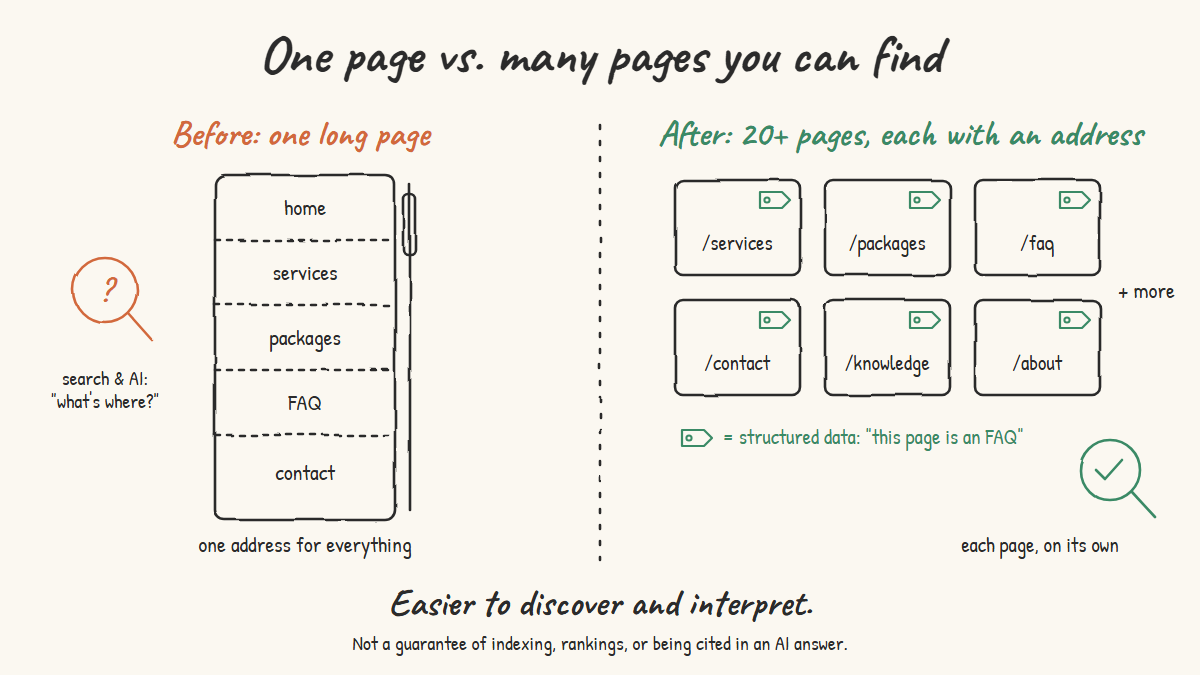
That's the real trigger: not "WordPress is old," but "we have nine days, real momentum to back up, and a draft that needs a different shape to be found."
2. What changed, concretely
The new stack has a few pieces, and each one does a specific job:
- Astro as the framework. It builds pages as plain, finished HTML ahead of time, instead of assembling each page on request the way ESGready's previous setup did.
- Cloudflare Workers for hosting and deploy. The finished pages live on Cloudflare's edge network, so a visitor in Berlin and a visitor in São Paulo both load the site from a data center near them.
- Git and GitHub as the review layer, with automatic deploys and one-click rollback if something needs undoing.
- Claude Code doing a lot of what a page-builder plugin used to do: turning the one-page draft into more than twenty standalone, crawlable pages, keeping the cost calculator, package self-test, and obligations radar as working interactive features.
- Keystatic, a git-backed CMS, wired across the site's content so Frank could edit FAQ entries, testimonials, and page copy himself, without a developer, once the build was done.
The site went live inside the nine-day window, ahead of the webinar. (Full build timeline, screenshots, and every number: see the case study.)
3. Where the new setup is clearly better
Not "faster" or "more secure" as vague adjectives. Here's the actual mechanism behind each claim.
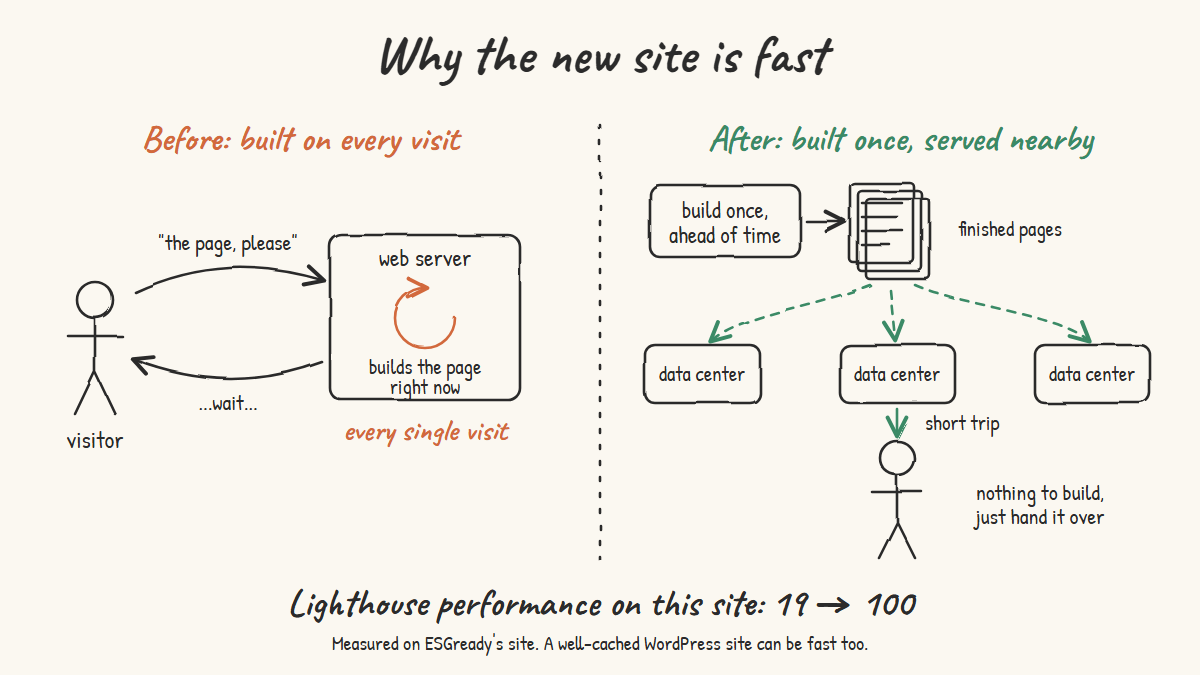
Speed. ESGready's previous setup rendered each page on request. The new site's public pages are prerendered once, ahead of time, and served as finished HTML from whichever Cloudflare data center is closest to the visitor. Measured with Lighthouse: this specific site went from a performance score of 19 out of 100 to 100. That's this migration's measured result, not a guarantee that every WordPress site is slow or that every Astro site scores 100 (a well-cached WordPress setup can also be fast).
Findability. One page became more than twenty separate, addressable pages, each carrying structured data describing its content. That makes the content easier for search engines and AI systems to discover and interpret. It doesn't by itself guarantee indexing, search rankings, or being cited in an AI-generated answer.
Security. The public pages are read-only, with no database and no plugins behind them, which removes a category of attack surface common to WordPress sites. The CMS login page is still a public address anyone can find. It has no password of its own, though: it hands off to a GitHub login, so what keeps strangers from editing the site is the GitHub accounts with access to the project (with 2-factor login on, and as few people as possible), plus private deploy keys. The tradeoff is fewer public-facing things to patch, not zero security work.
Preview before publish. On this project, every change gets a real preview URL before it touches the live version, with one-click rollback available if something needs adjusting. That's how this team works, not an automatic property of every Astro or Cloudflare site, and WordPress can support a similar staging habit too, it's just not the default.
Hosting cost. At ESGready's traffic level, Cloudflare hosting costs close to nothing against the roughly 10-euro-a-month WordPress plan it replaced. That's this site's actual comparison, not a universal rule: Cloudflare bills static assets and Worker requests separately, and hosting cost is only one part of the total cost of running a site.
4. A real bump in the road, and what it taught us
Here's the part most comparison posts skip: this stack doesn't fail the way WordPress fails. It fails in its own, different ways, and finding one of them was a genuinely interesting few hours of detective work.
Shortly after the CMS went live, its login page started showing a "page not found" message in every real browser, while command-line tools checking the same address got the correct page back every time. That mismatch made it look like a caching issue at first. The real cause turned out to be a routing setting: Cloudflare's static file server was answering browser page requests directly with the not-found page, without ever handing the request to the application code that would have served the CMS correctly. Command-line tools request pages differently than browsers do, so they sailed right past the very thing that was broken.
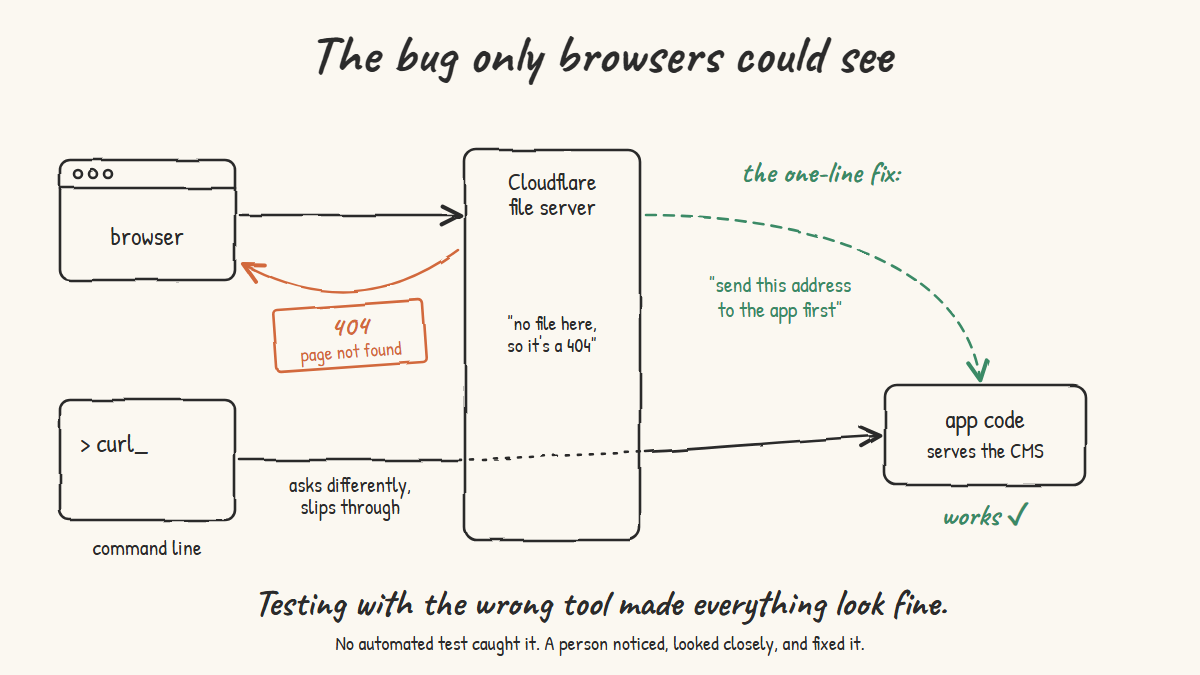
The fix was a one-line configuration change. Worth naming honestly: this project doesn't run an automated test suite, so catching this depended on someone noticing and looking closely, not on an automated check catching it first. That's a genuinely useful thing to know about this way of building, and it's now a documented lesson for the next project.
5. Where WordPress was genuinely easier
- The visual editor. WordPress's Gutenberg editor lets anyone log in and change any page, any time, with no developer involved. It's not just editing existing content, it's building a brand-new page or rearranging a whole section from scratch. Keystatic, the CMS layer here, edits predefined fields (an FAQ answer, a testimonial, a paragraph of copy), not the layout itself.
- Client-led page building. On WordPress, a founder can add a page or rearrange sections himself, on his own schedule, without waiting on anyone.
- A whole plugin ecosystem. Forms, SEO tools, image galleries, booking calendars: WordPress has a plugin for almost all of it, ready to install. On the new stack, each of those is either custom-built or goes without.
- Familiarity. WordPress runs a huge share of the web. Far more people, freelancers, agencies, in-house hires, already know how to work in it, compared to Astro and Cloudflare Workers.
None of that disappears just because this migration made the site faster, less exposed on the public side, and easier to find. It's a real tradeoff, not a one-sided win, and not every WordPress site is necessarily slow, insecure, or expensive, a well-configured one can avoid several of these tradeoffs too. Likewise, Keystatic's limits described here reflect how it was configured for this project, not a hard ceiling on what an Astro-based site can support with more CMS setup.
6. The actual tradeoff, in one sentence
WordPress optimizes for "any non-technical person can change anything through a login screen," and pays for that flexibility in speed, security, and ongoing maintenance, depending on how it's set up.
This stack, as built for ESGready, optimizes for pages that are fast to serve, a smaller public-facing attack surface, low hosting cost at this traffic level, and content that's easier for search and AI systems to find and parse, and it asks for a developer or an AI coding tool in the loop for anything beyond routine content edits, with its own unfamiliar failure modes to learn along the way.
Neither of those is the "better" choice in the abstract. They're built for different priorities, and this stack wouldn't suit a business that wants full visual control over layout and new page types with zero developer involvement, which is a real thing to want.
7. How to weigh this for your own site
If this tradeoff sounds familiar, here's how to apply it instead of just nodding along.
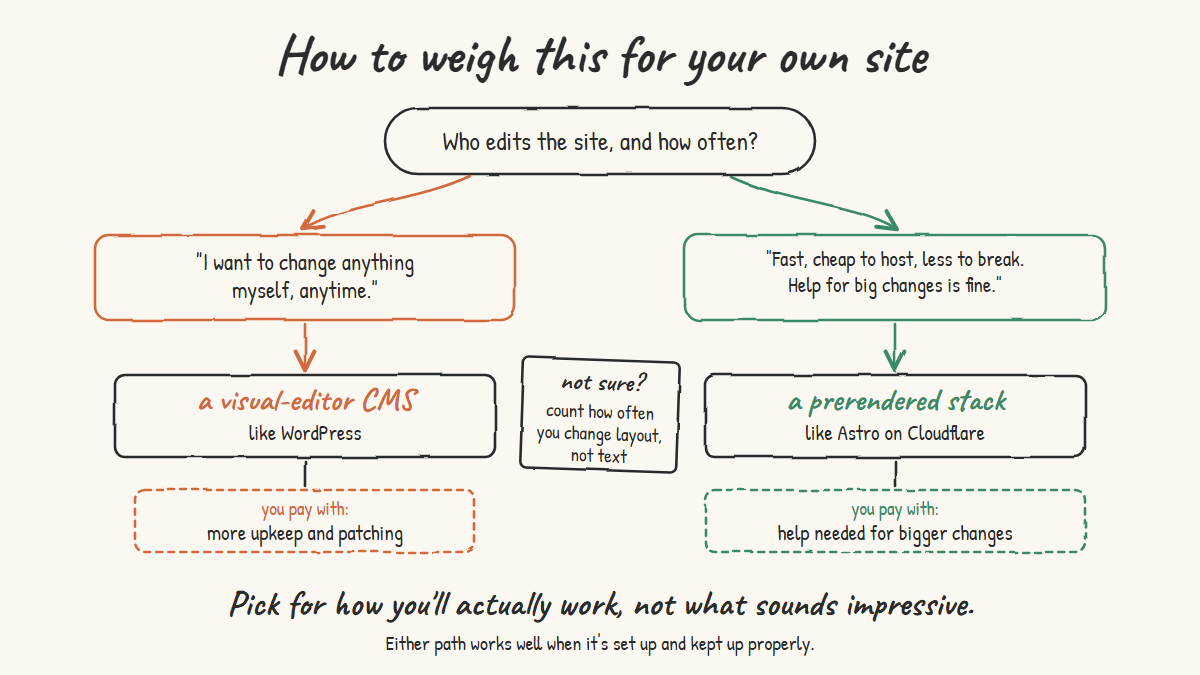
Ask yourself what "editing the site" means to you day to day. Swapping a headline or an FAQ answer is one thing. Building a new landing page from scratch, or rearranging a whole section, is a different thing entirely. Be specific about which one you actually do.
If the answer is "I want to change anything myself, with zero help, whenever I want," that's a real preference, and WordPress (or a similar CMS with a visual editor) is built for exactly that. The tradeoff tends to be a larger attack surface to maintain and hosting bills that scale with traffic, though how much depends on how the site is set up and kept updated.
If the answer is "I mostly want the site to be fast, cheap to host, hard to break on the public side, and easy for search and AI systems to find and parse, and I'm fine looping in a developer or an AI tool for anything bigger than a text change," a stack like Astro on Cloudflare fits that better. The cost is independence, and a different set of failure modes you'll need someone technical to diagnose when they show up.
Either way, ask one more question before deciding: who is actually going to touch this site after launch, and how often? A solo owner making occasional tweaks has different needs than a five-person marketing team publishing daily. The right stack follows from that answer, not from which one sounds more impressive.
8. What was true for ESGready
For ESGready, at this moment, the tradeoff was worth making. Page speed, a smaller public-facing attack surface, content that's easier for search and AI systems to find and parse, and a lower ongoing hosting cost mattered more than full visual control over layout, and Frank knew going in that the CMS covers routine edits, not full page building.
On the speed difference, in Frank's own words: "you can never achieve that with WordPress." That's Frank's own experience and reaction, worth keeping exactly as he said it, not a technical rule to adopt as this piece's conclusion; a well-optimized WordPress site with proper caching can also be fast. What's specific and verified here is this migration's measured Lighthouse result and Frank's own words about it.
That won't be true for every business, and it doesn't need to be. The point of this piece isn't "switching stacks guarantees these results." It's "here's what this stack suited ESGready's priorities and produced, here's what we actually traded for it, and here's one honest bump along the way, so you can weigh the same trade for your own situation." (For the full story, numbers, and before/after screenshots: the case study.)
Frequently Asked Questions
Is a static site on Cloudflare cheaper than WordPress hosting?
Often, but not automatically, Cloudflare bills static assets and Worker requests separately, so the exact cost depends on the site. In this case, hosting dropped from a roughly 10-euro-a-month WordPress plan to close to nothing at ESGready's traffic level. Hosting cost is also only part of the total cost of running a site.
Can a non-developer edit an Astro site the way they'd edit WordPress?
Partly. A git-backed CMS layer (Keystatic, in this case) can let a non-developer edit predefined content, FAQ entries, testimonials, page copy, through a form-like interface, and the founder here was trained to run it himself. What it doesn't give you is WordPress's Gutenberg editor: the ability to build a brand new page or rearrange a layout freely. That part still needs a developer or an AI coding tool.
Does migrating from WordPress to Astro hurt SEO rankings?
It doesn't have to, though no migration guarantees unchanged rankings. Setting up relevant permanent redirects for every old URL helps preserve access and ranking signals, so visitors and search engines land on the new page instead of hitting a dead link. In this migration, 21 legacy URLs were redirected in a single hop.
Is Claude Code a replacement for a WordPress page builder plugin?
Functionally, it fills a similar role: it writes and edits page layouts on request. The difference is what happens behind that request. A page builder plugin changes a database row on a live site. Claude Code changes source files, which then go through a preview URL and a review step before anything goes live.
Is a static site more secure than WordPress?
The public pages typically have less to attack: they're read-only, with no database and no plugins behind them, which removes a category of attack surface common to WordPress sites. That's not the whole picture. The CMS login page is still publicly reachable; in this setup it hands off to a GitHub login, so the GitHub accounts with access to the project (2-factor on, few people) and private deploy keys are what need securing. A well-maintained WordPress site can still be reasonably secure.
Does a static site on Cloudflare ever break in production?
Yes, just in different ways than WordPress does. One migration hit a routing quirk where a server-rendered admin page returned a "not found" message to every real browser while command-line tools got the correct response. A one-line configuration fix resolved it. Worth knowing: without an automated test suite, catching that kind of thing depends on someone noticing, which is exactly what happened here.
What's the biggest downside of leaving WordPress?
Independence. On WordPress, a non-technical owner can rearrange a whole page themselves. On a stack like Astro and Cloudflare, most changes beyond routine content edits through a CMS layer need a developer or an AI coding tool in the loop.
References and further reading
Everything this article claims, you can check yourself. The first link has the full ESGready numbers; the rest are the official docs behind each technical point, and a good place to start if you want to go deeper on one topic. All links checked on 30 September 2026.
| # | Source | What you'll find there | Relevant to |
|---|---|---|---|
| 1 | ESGready case study (Mindful AI Academy) | The full project story: the nine-day timeline, Lighthouse 19 to 100, the 21 redirects, before/after screenshots | Sections 1 to 3, 8 |
| 2 | On-demand rendering (Astro docs) | Astro builds pages as static HTML ahead of time by default, and how to switch single pages to on-request rendering | Sections 2, 3 (Speed) |
| 3 | Lighthouse performance scoring (Chrome for Developers) | What the performance score measures and how it's weighted, so you know what "19 to 100" means | Section 3 (Speed) |
| 4 | Cache (WordPress Advanced Administration Handbook) | How caching plugins and server caches serve WordPress pages as static files, the reason a well-cached WordPress site can be fast too | Section 3 (Speed) |
| 5 | Understand the JavaScript SEO basics (Google Search Central) | Google does render JavaScript, and what still makes JavaScript-heavy pages harder to index | Section 1 |
| 6 | Introduction to structured data markup (Google Search Central) | What structured data is, and why it makes pages eligible for richer results without guaranteeing them | Section 3 (Findability) |
| 7 | Keystatic GitHub mode (Keystatic docs) | How the /keystatic login hands off to GitHub, and that only people with write access to the repository can get in | Section 3 (Security), Section 5 |
| 8 | Configuring two-factor authentication (GitHub Docs) | Step-by-step setup of 2-factor login for the GitHub accounts that guard the CMS | Section 3 (Security) |
| 9 | Hardening WordPress (WordPress Advanced Administration Handbook) | The official checklist for keeping a WordPress site secure: updates, plugins, admin access, backups | Section 3 (Security), FAQ |
| 10 | Previews (Cloudflare Workers docs) | How preview URLs let you check a change in a production-like copy before it goes live | Section 3 (Preview before publish) |
| 11 | Billing and limitations for static assets (Cloudflare Workers docs) | Static file requests are free and unlimited; running Worker code is billed separately | Section 3 (Hosting cost), FAQ |
| 12 | Worker script routing (Cloudflare Workers docs) | The run_worker_first setting: the one-line fix from the bug story, and why it decides whether a request reaches your code | Section 4 |
| 13 | How to move a site (Google Search Central) | Google's migration guide: permanent (301/308) redirects, and why rankings can fluctuate for a while after a move | FAQ (SEO rankings) |
| 14 | WordPress Block Editor (WordPress.org) | The Gutenberg editor that lets anyone build and rearrange pages visually | Section 5 |
| 15 | Claude Code overview (Claude Code docs) | What Claude Code is, how it edits files and works with git, and how to get started | Section 2 |
Wondering whether a move like this fits your own site? Let's look at how you actually edit it, and what you'd trade.
See AI-Native Websites